
Back to Guidelines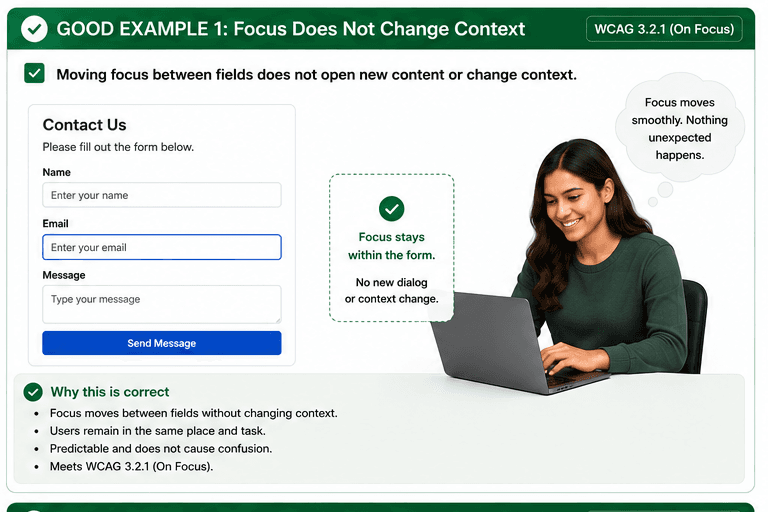
What is On Focus?
Changing focus does not initiate a change of context.
Changing focus does not initiate a change of context.
- Keyboard and screen reader users.
- People who need predictable interactions.
- Users who benefit from visible focus and clear labels.
Good vs Bad Examples
Use the tabs to compare the accessible pattern with the example to avoid.
Good Example 1 – Focus Stays Inside the Form
html live code
<input type="text" aria-label="Email" />
<button type="button">Send Message</button>
Why this is correct (developer logic):
- Moving focus between fields does not open a dialog.
- The user stays in the same form and keeps control.
- The next action happens only after explicit activation.
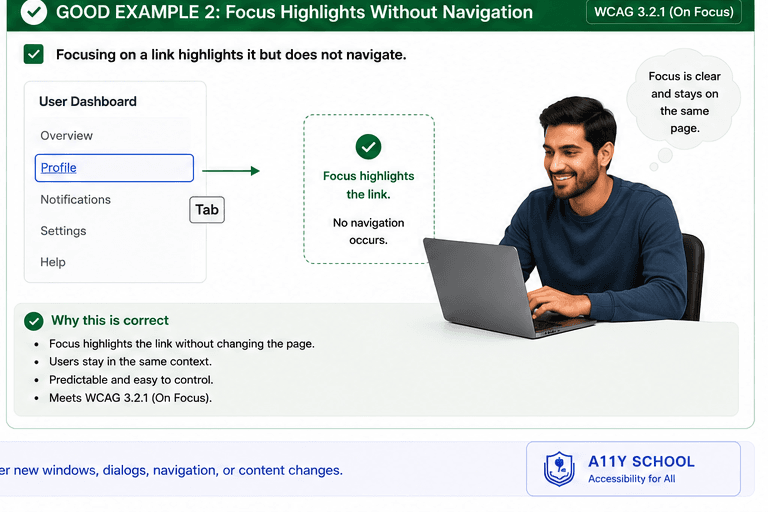
Good Example 2 – Focus Highlights Without Navigation
html live code
<a href="/profile">Profile</a>Why this is correct (developer logic):
- Focus highlights the link without changing pages.
- Navigation happens only when the link is activated.
- The user remains on the same page until they choose to move.
Implementation Checklist
Progress0 / 5 completed (0%)
Knowledge Check
Answer Yes or No to test your understanding of on focus.
Score: 0 / 3 · Answered: 0 / 3