
Back to Guidelines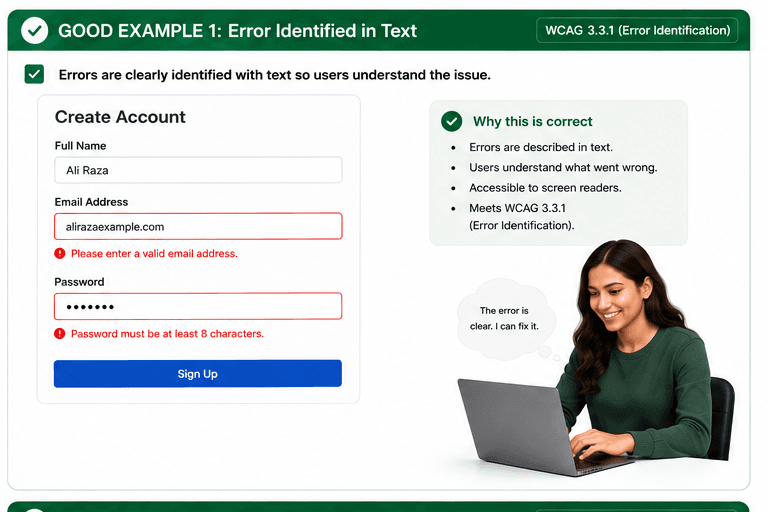
What is Error Identification?
Errors are identified in text so users understand what went wrong.
Errors are identified in text so users understand what went wrong.
- Keyboard and screen reader users.
- People who need predictable interactions.
- Users who benefit from visible focus and clear labels.
Good vs Bad Examples
Use the tabs to compare the accessible pattern with the example to avoid.
Good Example 1 – Error Identified in Text
html live code
<input aria-describedby="email-error" />
<p id="email-error" role="alert">Please enter a valid email address.</p>
Why this is correct (developer logic):
- Each error is described in text.
- Screen reader users can understand what went wrong.
- The problem is clear without relying on color alone.
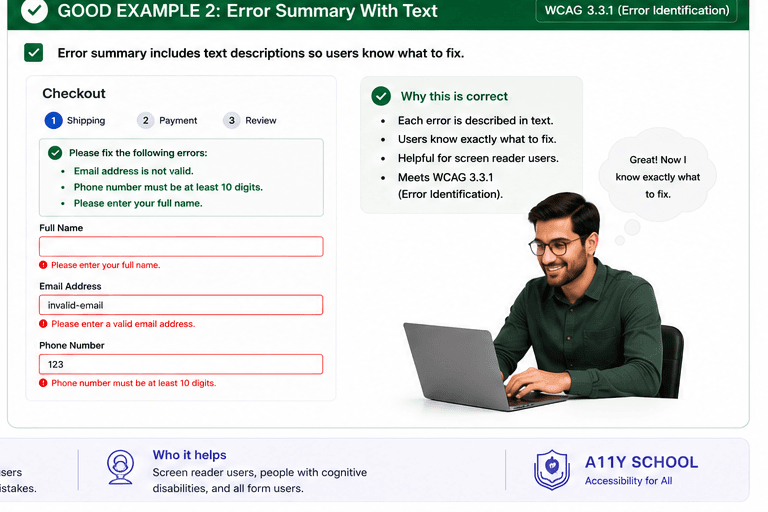
Good Example 2 – Error Summary With Text
html live code
<div role="alert" aria-live="polite">Please fix the following errors: Email address is not valid.</div>Why this is correct (developer logic):
- The summary explains exactly what needs fixing.
- Each field still keeps its own text error message.
- Users can quickly review and correct mistakes.
Implementation Checklist
Progress0 / 5 completed (0%)
Knowledge Check
Answer Yes or No to test your understanding of error identification.
Score: 0 / 3 · Answered: 0 / 3