
Back to Guidelines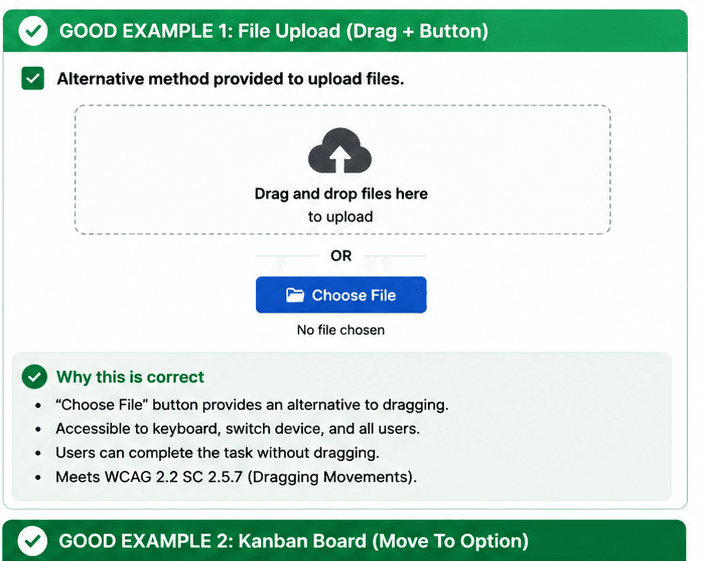
What is Dragging Movements?
Dragging actions have a simple alternative without dragging.
Dragging actions have a simple alternative without dragging.
- Keyboard and screen reader users.
- People who need predictable interactions.
- Users who benefit from visible focus and clear labels.
Good vs Bad Examples
Use the tabs to compare the accessible pattern with the example to avoid.
Good Example 1 – File Upload with Button Alternative
html live code
<input type="file" aria-label="Upload files" />Why this is correct (developer logic):
- Choose File gives users a non-dragging alternative.
- Drag-and-drop remains optional for pointer users.
- Keyboard and assistive technology users can upload files.
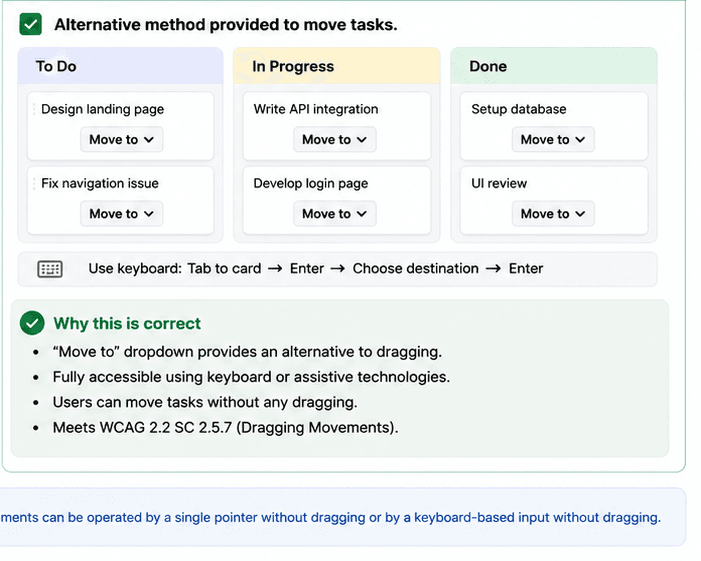
Good Example 2 – Kanban Board with Move Options
html live code
<button type="button">Move to: Done</button>
<button type="button">Move to: In Progress</button>
Why this is correct (developer logic):
- Move to controls replace drag-only task movement.
- Users can reorder items with keyboard support.
- Pointer users still keep an easy drag option.
Implementation Checklist
Progress0 / 5 completed (0%)
Knowledge Check
Answer Yes or No to test your understanding of dragging movements.
Score: 0 / 3 · Answered: 0 / 3